


Dokmee Document Management
Dokmee is a secure, easy to use cloud document management system designed for a variety of purposes including document capture and storage, search and retrieval, and file sharing. Dokmee adapts to any business model by maximizing accessibility and functionality in repositories of all sizes while increasing collaboration and communication between users. With a very user friendly interface available in 19 languages, Dokmee is the smart and flexible choice. A document management system software helps you secure, organize and manage files efficiently.
Why Dokmee ?
No matter the size of your business, Dokmee provides document management solutions that help you centralize your electronic documents, streamline your company’s workflow, and free up IT staff for more valuable activities than managing documents. Accurate & Fast info leads to a correct decision making which in turn boosts your company’s value while Increasing Efficiency & Success Retention by reducing cost. It is a Smart Document Management system due its special capability to recognize identical documents which in turn will reduce unnecessary manual work. It is user friendly due to its availability in 19 languages and in Mobile version which is a convenient and fast way to access your Dokmee documents from your mobile device. It is organized and allows authorized access only. Dokmee creates smart archiving system for all your documents. Users can annotate files with markups and notes, and even use add-ins to collaborate on those files using Microsoft Word, Excel and outlook. And because Dokmee allows multiple users to view files at the same time, it’s much easier for your employees to collaborate on important documents. Dokmee, an enterprise content management system offers more than just a digital archive of your documents. It also provides a powerful way to streamline your company’s document workflow.

Awards
Technology Partners
Organization & Retention
Manually and automatically sort files into an unlimited number folders and levels with an easy to use Windows like folder structure. Automatic OCRing & Recreation of files & searchable based on the content is possible now in Dokmee by dragging the entire folder structure in Dokmee if you already have files and folders organized in Windows. Automatically purge, export, and delete files based on a specified retention period.
Security
For easy report generation, all system and file activity is tracked and recorded with the built in audit log & to ensure that accessibility is restricted to authorized Dokmee users only, all files imported and created with Dokmee are encrypted on the server. Secure files with user restrictions at the file cabinet, folder, and file level along with Active Directory integration.
File Sharing & Collaboration
Built-in viewing capabilities for PDF, TIFF, JPG, PNG, BMP, GIF, DWG, DXF, MSG, EML, and much more helps store, manage and share any file types across the organization with serenity. Multiple users can view files simultaneously, due to a collaborative Microsoft Office viewer, open and edit Word, Excel, PowerPoint, Visio files along with version control for revision and editing by adding annotations, mark-ups, notes to files etc.Workflow
Workflow
Dokmee Workflow enhances existing document-driven business processes, improving productivity, manage document flow associated with a business process insight for multi-user approval requirements. Benefits emerge quickly as documents and other business contents are directed automatically to the right place at the right time with email notification, simplifying collaboration and improving efficiency throughout your organization. With document workflow and enterprise content management software, users can tell when they have work to do, and managers can monitor the steps within workflows. The Workflow inbox is also accessible from the Dokmee Web and Dokmee Mobile products.
- Individual user inboxes
- Email notifications and reminders
- Automatic document stamping
- Index field updates based on approval or rejection
- Document flow history tracking
OCR and Annotations
One of the most powerful and accurate OCR reading results ever for more the 134 languages Arabic and English as well. Convert images to searchable files: PDF, TIFF, JPEG, and more. Add annotations layers to images such as custom stamps, sticky notes.
HOW IT WORKS
Dokmee Desktop
Dokmee is a secure, easy to use enterprise document management system designed for a variety of purposes including document capture and storage, search and retrieval, and file sharing. Dokmee adapts to any business model by maximizing accessibility and functionality in repositories of all sizes, while increasing collaboration and communication between users. With a very user friendly interface available in 19 languages, Dokmee is the smart and flexible choice.

Dokmee Plugins
Dokmee DMS provides variety of six Plug-ins or system software to ease a user’s daily processing with high level integration for Microsoft office products and scanners.The user can easily use these tools to directly upload files to a specific destination in DMS. Available Plug-ins: (Dokmee Sync, Virtual Printer, Fujitsu Scan-snap, Microsoft Word, Microsoft Excel and Microsoft Outlook).

Dokmee Mobile
With a complete document management solution on your mobile device, never worry about being disconnected from the office again. No matter where you are, easily access files and folders at the touch of your finger with the free Dokmee Mobile app. As long as you have an internet connection, via WiFi or mobile data plan, remain connected while at the airport, doctor’s office, in between meetings, or wherever you may be. Formatted for both phones and tablets. Download the Dokmee application from Appstore & Playstore for iPhones & Samsung, Dokmee Mobile is an excellent substitute to have full access to your documents in your mobile.

Dokmee Capture
Dokmee Capture is a Document Capture Software offering unlimited scanning with no per click charges, automated data capture options, and unmatched reporting and auditing tools. It provides the ability and feature set to automate the process of scanning paper documents by also providing the basic ability to scan to any number of image file formats. Therefore, to convert large physical files into the electronic organized archives, centralizing scanning departments within large corporations, and for scanning service offices, Dokmee Capture is surely the ideal product since it is a method of converting paper to searchable electronic files in a manner that saves both time and money.
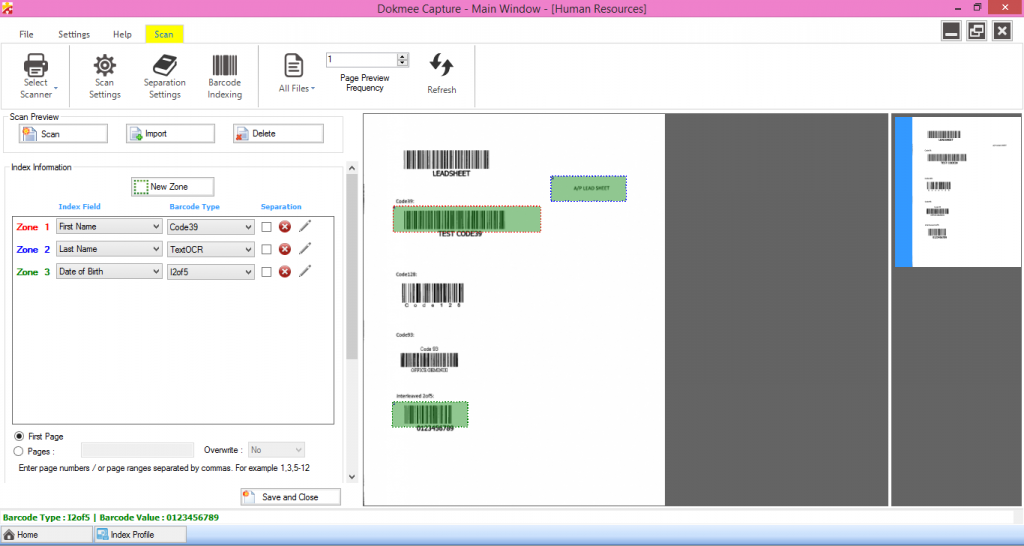
Dokmee Capture (Automated Data Capture)
Dokmee Capture provides the tools for efficient and accurate automated data extraction, which in turn leads to easy to find and retrieve electronic files.
- Barcode – 1D & 2D
- QR Code & Data Matrix
- OCR – Typed Text
- ICR – Handwriting
- MICR- Banking Font
- OMR – Check Boxes and Fill in Bubbles
- Smart Zone OCR for Variable Location Text and Line Items
- Database Look Up & Matching – SQL, CSV, Excel, TXT
Scan and Import
Works with most TWAIN and ISIS driver scanners. Integration with image enhancement driver software such as Kofax VRS, Kodak Perfect Page, Visioneer Acuity, and Fujitsu PaperStream IP. Automatic import options for network devices and pre-scanned images that may require further processing. Import TIFF, PDF, JPEG, BMP files. Quality Control Index, Data Entry, Bookmark Creation Export Scanned Images with Metadata Understand Your ROI (Return On Investment).
Quality Control
Post scan image enhancement options such as despeckle, deskew, image crop, hole punch removal, border removal, and more. Editing tools and practical time-saving shortcut options such as hotkeys that are intuitive to use make the scanning and quality control process faster and more accurate than ever.
Index, Data Entry, Bookmark Creation
Multiple index profiles and metadata templates ensure that all of your document types are uniquely and personally tagged with important information for easy search and retrieval later. Manually or automatically index files with various field types such as text, number, date, and select lists. Create PDF Bookmarks manually or automatically from barcode values. Export Scanned Images with Metadata Understand Your ROI (Return On Investment).
Export Scanned Images with Metadata
Push images and data into any document management system or file sharing structure, along with automatic file naming and folder creation for quick and efficient organization and collaboration. Supported export image formats include TIFF, PDF, PDF/A, JPEG, GIF, BMP. Metadata may be exported as TXT, CSV, XML, and other customizable formats. Understand Your ROI (Return On Investment).
Understand Your ROI (Return On Investment)
Track the productivity and efficiency of users and processes. The built-in reporting tool allows administrators to track and audit productivity and profitability automatically versus an alternative manual logging process. Input costs and revenue so that profitability reports are automatically generated. Reports can be generated by profile, batch, module, or user for specific periods of time. Save and send out to managers in Word, Excel, PDF, and SAP Crystal Reports format. Dokmee made enterprise content management simple.